音源とエフェクトが最初から入っています。
アプリを開いてすぐ、内蔵音源を鳴らし、エフェクトで音を作り、曲にできます。

iPhone・iPadで作って、PCで仕上げる。
付属の音源とエフェクトで曲を作り、手元で始めた制作をPCのNINZYA Board 1.3.0で続けよう。
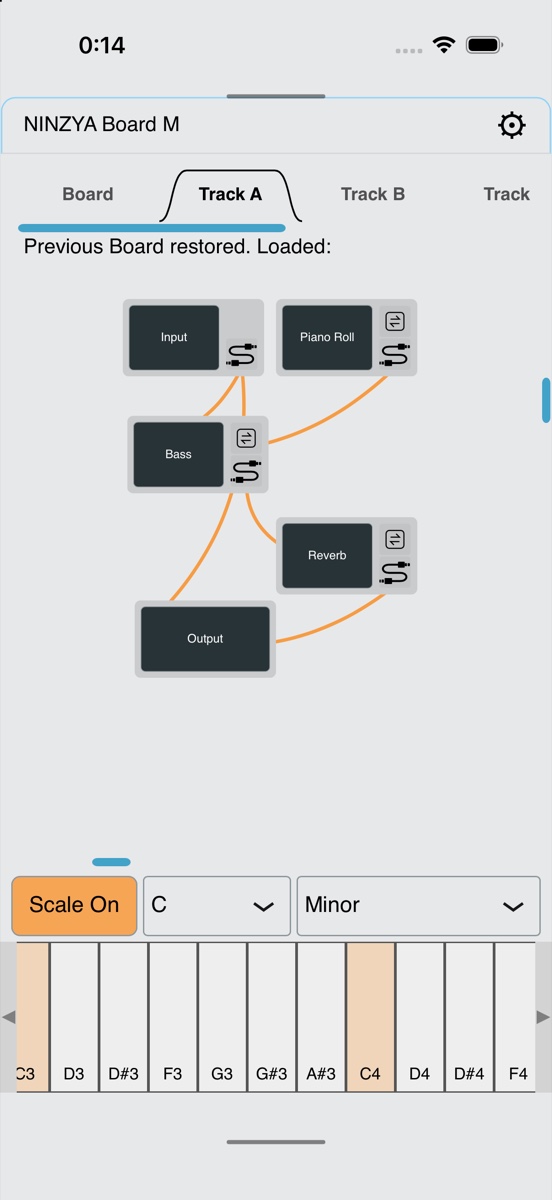
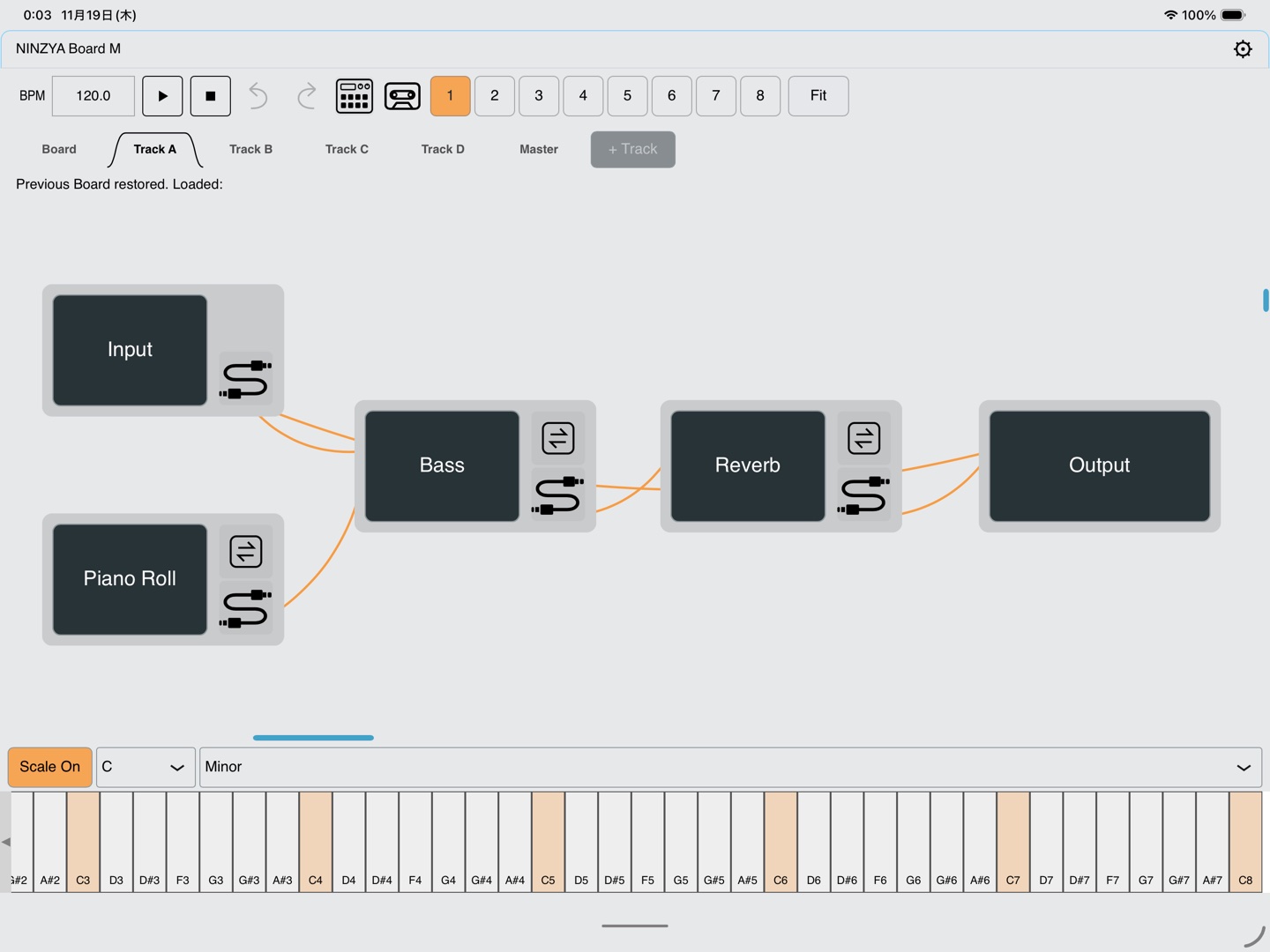
音源を置く。出力につなぐ。鍵盤を弾く。ツアーに沿ってアプリを操作しながら、最初の音を鳴らすところから始められます。Piano Rollでフレーズを作り、Boxで演奏するところまで案内します。
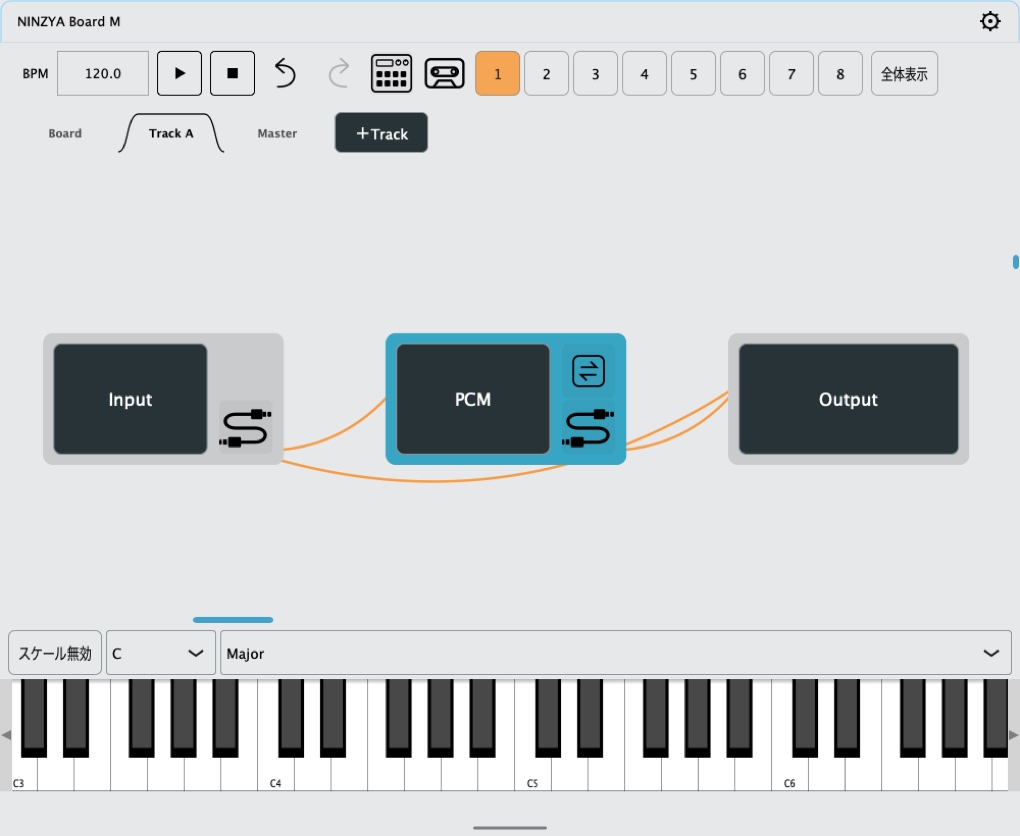
アプリを開いてすぐ、内蔵音源を鳴らし、エフェクトで音を作り、曲にできます。
Piano Rollのスケール機能をオンにすると、選んだスケールの音だけが表示され、メロディやベースラインを打ち込みやすくなります。
 PCM
 2 OSC
 SAW
 Bass
 Reverb
 Delay
 Dist
 Particul
 Shimmer
 Piano Roll
 Step
 Sticker
内蔵モジュール 全28種類
iPhoneやiPadでフレーズを組み、パッチを作ったら、プロジェクトを書き出してPC版のBoard 1.3.0へ。Mac・Windowsで読み込み、音色やミックスを調整しながら仕上げられます。
PC版 NINZYA Board 1.3.0を見る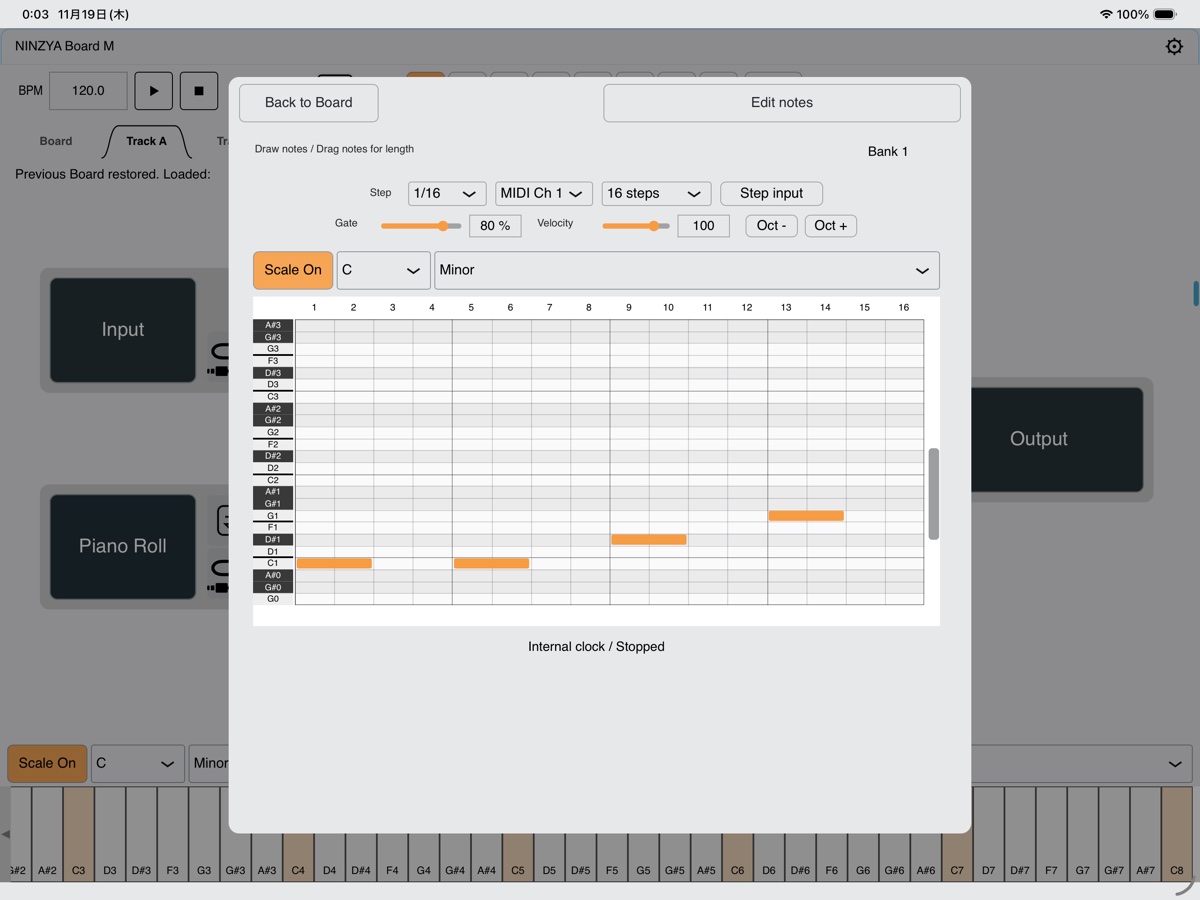
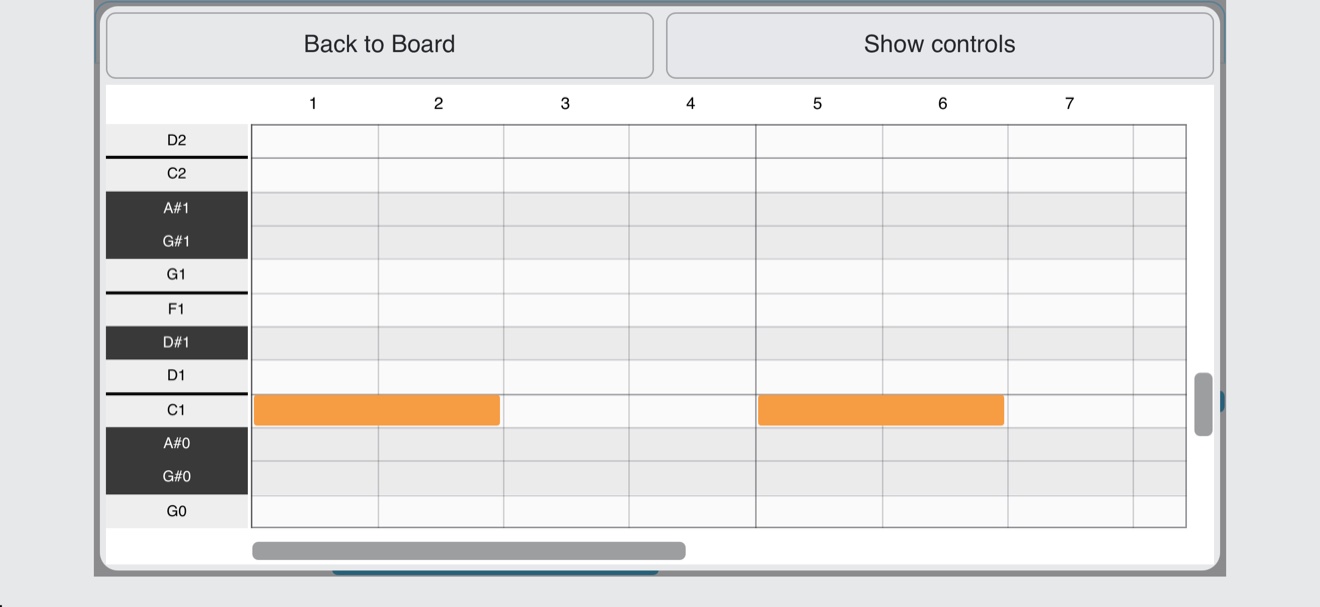
縦画面のCanvasでモジュールをつなぎ、画面下から鍵盤を呼び出してすぐに試奏できます。Piano Rollは音符をタップしやすいようにマス目を大きくし、横画面でも編集できます。
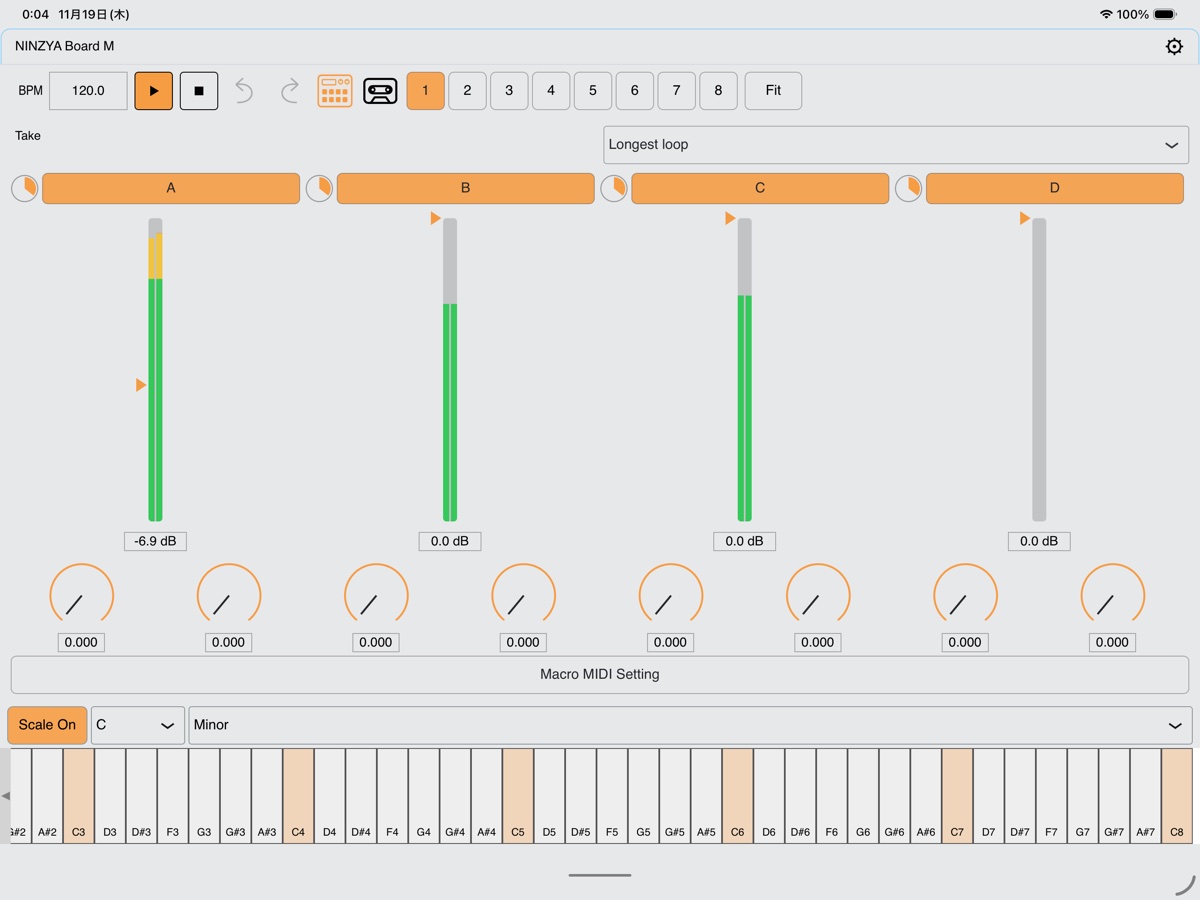
手持ちの対応AUv3音源やエフェクトも、内蔵モジュールとつないで使えます。Boxモードに切り替えれば、4トラックのパターンを切り替えたり、フェーダーで音量を調整したりしながら、その場で演奏できます。
配色を変えたり、好きな画像をステッカーとして飾ったり。Boxの見た目も手軽にカスタムできます。
内蔵音源やエフェクト、対応AUv3を配線して自分のパッチを作る。
音符を置き、長さやタイミングを調整してフレーズを組み立てる。
8つのバンクにパターンを用意し、曲の展開を組み立てる。
Start on iPhone or iPad. Finish on desktop.
Make a track with the included instruments and effects, then continue your project in NINZYA Board 1.3.0 on desktop.
Add an instrument, connect it to an output, and play your first notes. Follow the in-app tutorial tour through making a phrase in Piano Roll and performing in Box.
Open the app, play the built-in instruments, shape the sound with effects, and start composing.
Enable the scale feature in Piano Roll to show only the notes in your chosen scale, making melodies and basslines easier to write.
PCM2 OSCSAWBassReverbDelayDistParticulShimmerPiano RollStepSticker28 built-in modules
Build a phrase and a patch on iPhone or iPad, then export your project to Board 1.3.0 on Mac or Windows. Continue shaping the sound and mix there.
Explore NINZYA Board 1.3.0 for desktopConnect modules on the portrait Canvas and bring up the keyboard from the bottom edge to try your sound. Edit notes on the larger Piano Roll grid, in portrait or landscape.
Connect compatible AUv3 instruments and effects alongside the built-in modules. Switch to Box mode to change patterns across four tracks and adjust levels with the faders as you perform.
Change the colors and add your own images as stickers to customize Box.
Connect built-in instruments, effects, and compatible AUv3 plug-ins to create your patch.
Place notes and adjust their length and timing to build phrases.
Prepare patterns in eight banks and arrange your performance.
在 iPhone 或 iPad 上创作,在电脑上完成。
使用内置音源和效果器创作,再在电脑版 NINZYA Board 1.3.0 中继续完成作品。
添加音源,连接输出,弹奏第一个音。跟随应用内互动教程,学习在 Piano Roll 中编写乐句,再通过 Box 演奏。
打开应用即可演奏内置音源,使用效果器塑造音色并开始作曲。
开启 Piano Roll 的音阶功能后,只显示所选音阶中的音符,让旋律和贝斯乐句更容易编写。
PCM2 OSCSAWBassReverbDelayDistParticulShimmerPiano RollStepSticker共 28 个内置模块
在 iPhone 或 iPad 上编写乐句并搭建连接后,导出工程,在 Mac 或 Windows 的 Board 1.3.0 中继续调整音色和混音。
查看电脑版 NINZYA Board 1.3.0在竖屏 Canvas 中连接模块,从底部呼出键盘即可试奏。Piano Roll 使用更大的网格方便点击音符,也支持横屏编辑。
兼容的 AUv3 音源与效果器可和内置模块一起连接。在 Box 模式下切换四个轨道的节奏型,通过推子调整音量并现场演奏。
调整配色,添加喜欢的图片作为贴纸,轻松自定义 Box。
连接内置音源、效果器和兼容的 AUv3 插件,创建自己的组合。
放置音符,调整长度与时间,编写乐句。
在八个 Bank 中准备节奏型,编排歌曲的展开。
Commencez sur iPhone ou iPad. Finalisez sur ordinateur.
Composez avec les instruments et effets inclus, puis poursuivez votre projet dans NINZYA Board 1.3.0 sur ordinateur.
Ajoutez un instrument, connectez-le à une sortie et jouez vos premières notes. Le tutoriel intégré vous guide pour composer une phrase dans Piano Roll et jouer avec Box.
Ouvrez l’application, jouez avec les instruments intégrés, façonnez le son avec les effets et commencez à composer.
Activez la fonction de gamme dans Piano Roll pour afficher uniquement les notes de la gamme choisie et écrire plus facilement mélodies et lignes de basse.
PCM2 OSCSAWBassReverbDelayDistParticulShimmerPiano RollStepSticker28 modules intégrés
Créez une phrase et un patch sur iPhone ou iPad, puis exportez le projet vers Board 1.3.0 sur Mac ou Windows pour affiner le son et le mixage.
Découvrir NINZYA Board 1.3.0 pour ordinateurConnectez les modules sur le Canvas en mode portrait et ouvrez le clavier depuis le bas de l’écran. La grille agrandie de Piano Roll facilite la saisie, en portrait comme en paysage.
Utilisez vos instruments et effets AUv3 compatibles avec les modules intégrés. Passez en mode Box pour changer les patterns de quatre pistes et ajuster les niveaux avec les faders pendant votre jeu.
Changez les couleurs et ajoutez vos images comme stickers pour personnaliser Box.
Connectez instruments, effets intégrés et plug-ins AUv3 compatibles pour créer votre patch.
Placez les notes et ajustez leur durée et leur position pour composer des phrases.
Préparez des patterns dans huit banques pour construire votre morceau.
Auf iPhone oder iPad beginnen. Am Computer fertigstellen.
Komponieren Sie mit den enthaltenen Instrumenten und Effekten und arbeiten Sie anschließend in NINZYA Board 1.3.0 am Computer weiter.
Fügen Sie ein Instrument hinzu, verbinden Sie es mit einem Ausgang und spielen Sie die ersten Töne. Die integrierte Einführung führt weiter zu Phrasen in Piano Roll und zum Spielen mit Box.
Öffnen Sie die App, spielen Sie die integrierten Instrumente und gestalten Sie den Klang mit Effekten.
Aktivieren Sie die Tonleiterfunktion in Piano Roll, um nur die Noten der gewählten Tonleiter anzuzeigen. So lassen sich Melodien und Basslinien leichter eingeben.
PCM2 OSCSAWBassReverbDelayDistParticulShimmerPiano RollStepSticker28 integrierte Module
Erstellen Sie auf iPhone oder iPad eine Phrase und einen Patch. Exportieren Sie das Projekt und öffnen Sie es in Board 1.3.0 auf Mac oder Windows, um Klang und Mix weiterzuentwickeln.
NINZYA Board 1.3.0 für Computer ansehenVerbinden Sie Module im hochformatigen Canvas und öffnen Sie die Tastatur vom unteren Rand aus. Das größere Raster von Piano Roll erleichtert die Noteneingabe im Hoch- und Querformat.
Verbinden Sie kompatible AUv3-Instrumente und Effekte mit den integrierten Modulen. Wechseln Sie im Box-Modus zwischen Patterns auf vier Spuren und regeln Sie beim Spielen die Lautstärke mit den Fadern.
Ändern Sie die Farben und fügen Sie eigene Bilder als Sticker hinzu, um Box zu gestalten.
Verbinden Sie integrierte Instrumente, Effekte und kompatible AUv3-Plug-ins zu einem Patch.
Platzieren Sie Noten und passen Sie Länge und Timing an, um Phrasen zu erstellen.
Bereiten Sie Patterns in acht Bänken vor und gestalten Sie den Ablauf Ihres Songs.